

Meet GiggleSHARE
Easy Photo-Sharing & LIVE Gallery
Let guests share photos, videos, and messages instantly — no app, no hassle.
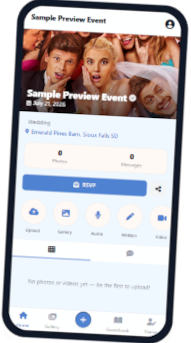
Seamless photos & video sharing for every event
Get started in minutes
Three simple steps to start collecting memories.
Schedule your event with options to personalize and make it yours !
Guests can RSVP, view your timeline and participate in the photo fun — all from a mobile device.
View the photo gallery, watch shared moments on a live TV display and later download all content from your event.
View your photos after the event in a keepsake Flipbook. This can be ordered as a digital or printed photo book.
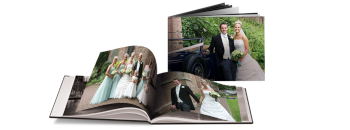
Ordinary is so last year
Capture event memories
the Easy Way!
Your event personalized & organized
Tools for a stress-free event start to finish.
Build the Excitement
Creat an event page with a live countdown to the fun!
Personalized Themes
Adjust the banner photo and guest page colors to match the vibe of your event.
Media Sharing Made Easy
Upload photos via QR link or text message — a feature exclusive to GiggleSHARE.
Directions to Your Event
Help guests find your event without frustration. Google maps provides turn-by-turn directions.
Download Photos After Event
You keep the event media in a digital file download for use after your event.
Planning Tools
RSVPs, Seating Counts, Timeline, Meal Selections and more with ease in one dashboard.
Ready to start the photo fun?
Get to know GiggleSHARE in under two minutes. No credit card required.